
Table of Contents
1. Data Transfer Via DATEV
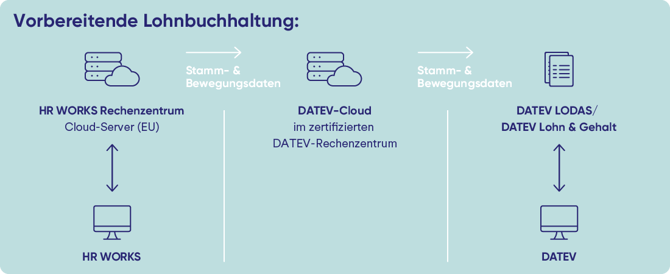
If you use DATEV LODAS or DATEV Lohn und Gehalt as your payroll system, HR WORKS offers a direct data exchange between HR WORKS and DATEV.
You can find an overview of the available DATEV integrations in the following article:
DATEV Datenservices
2. Data Transfer Via Reports
Using the HR WORKS Wage and Salary function, you can transfer payroll data to your payroll department through system reports and defined export formats.
To do this, go to the admin menu “Wage and salary/Reports.”
You can find an overview of the available system reports here.
More information about export formats can be found here.
/Wageandsalary.png?width=670&height=301&name=Wageandsalary.png)
3. Data Transfer Via Menu "Changes"
If you wish to send monthly updates of payroll-related data to your payroll office as a password-protected PDF file, open the admin menu “Wage and salary/Changes.”
The following types of changes can be listed in this document:
- New hires & departures (including employee master data for new hires in the entry month)
- Addresses & bank details
- Work schedules
- Child data
- Permanent establishments
- Health insurance details
- Recurring & non-recurring payments
- Meal grants
- Payroll-relevant absences & sick notes
- Short-time work
/changes.png?width=670&height=395&name=changes.png)